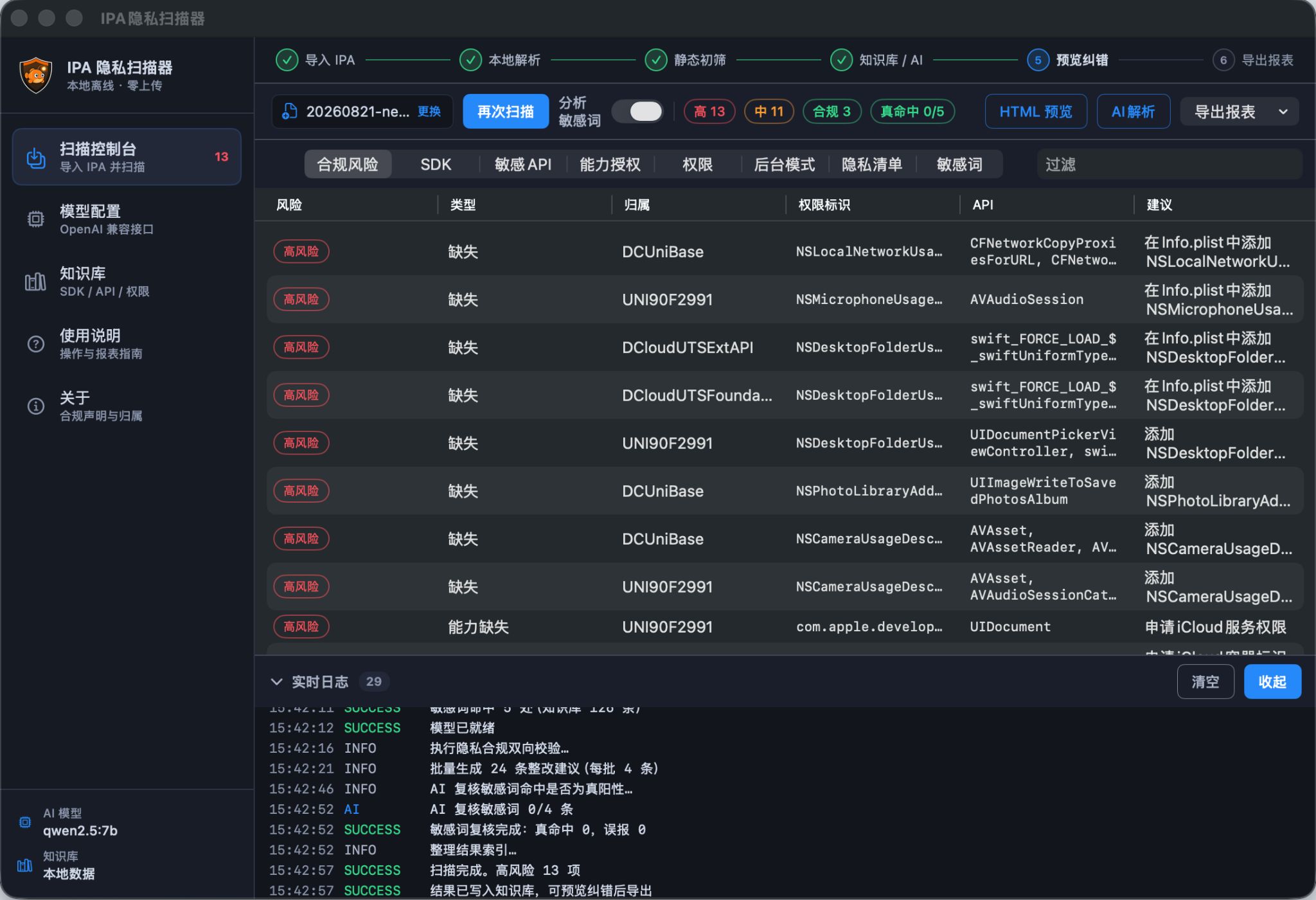
Many App Store 5.1.1 rejections come from Apple’s automated privacy scanner: missing or inaccurate privacy manifests, deprecated privacy API calls, improper permission keys, invalid background modes and misconfigured Capabilities. Manual reviews easily miss hidden issues. The Crab iOS 5.1.1 Privacy Compliance Scanner is a standalone pre‑review utility. It parses IPA, Mach‑O binaries, source code and configuration files without relying on Xcode build workflows, locates privacy risks automatically, interprets review logic with AI and produces structured compliance reports for 5.1.1 pre‑check before submission.
1. 5.1.1 Check Items Covered
The scanner maintains an up‑to‑date Apple privacy rule set and runs a multi‑pass compliance audit in one run. It scans sensitive strings and privacy literals, finds plaintext device identifiers and tracking text inside binaries and assets; detects privacy API invocations including restricted interfaces and deprecated tracking methods; validates permission keys and incomplete or non‑compliant Info.plist purpose strings; audits Privacy Manifest files for required entries, data collection types and SDK declarations; flags unused Background Modes; reviews Capabilities such as background location, Bluetooth and networking extensions that remain enabled unnecessarily.
2. AI‑Powered Risk Interpretation, Not Just Matches
Basic scanners only list matched items, leaving developers unsure which lines will trigger Apple’s automated checks. Crab includes an AI review interpreter. Each finding receives a severity level, an explanation of how it may cause a 5.1.1 rejection and actionable remediation templates. Risks are categorized as critical block‑level, machine‑review warning or manual‑review concern, with false positives filtered out. Reports cite relevant App Store guidelines and can be shared internally for remediation tracking.
3. Multi‑Engine Support and Clone App Batch Pre‑Review
The scanner works with native Objective‑C / Swift, Unity, Flutter, Cocos, Uni‑app as well as Frameworks, XCFrameworks and .a static libraries. It can scan multiple clone apps in batches and compare privacy signatures across variants to catch copied‑and‑pasted compliance defects before mass submission. Inputs include source folders, Xcode projects or built IPA archives; a full build environment is not required.
4. Two Modes: Standalone Audit and Obfuscation Pipeline
Privacy scanning and Crab iOS obfuscation are separate modules and can also be chained together. First, run the scanner for a compliance audit and fix hard defects in manifests, permissions and background settings. Second, apply obfuscation only to remaining binary sensitive features to encrypt strings and rename privacy symbols, reducing static detection risk. Scan reports feed risk hotspots into obfuscation tasks for targeted hardening instead of blind project‑wide transformation.
5. Standardized Exportable Compliance Reports
Reports contain project metadata, risk severity statistics, file locations, binary offsets, matched signatures, AI reasoning and remediation steps. HTML and JSON exports are supported, so the scanner can be plugged into CI/CD gates to block releases when risk thresholds are exceeded. Teams keep scan history per release, establish a compliance baseline and prevent regressions in later iterations.
6. Typical Workflow
1. Import source folder, Xcode project or IPA and launch the standalone privacy scan. 2. The engine inspects binaries, plists, privacy manifests and assets to collect all privacy‑related signatures. 3. AI grades risks against App Store rules and suppresses false positives. 4. Export a compliance report with high‑priority issues and remediation templates. 5. Fix manifest, permission and background‑mode defects in your codebase. 6. Optionally feed findings into the obfuscation module for targeted hardening of leftover binary sensitive patterns. 7. Rescan and confirm risk reduction before submitting to App Store.
Request a trial, then archive and submit
Download App Center, choose the General or Uni-app edition, then apply for a license on the registration-code page. The docs cover the operator steps.